Twinbox › Guides
How to block calls from unknown numbers
Robocalls, scam calls and call-center calls, stopped before they ring.
Robocalls, scam calls and call-center calls almost always come from numbers you have never saved. Twinbox has two switches on its Block list: "Unknown" rejects calls with no caller ID, and "Not in my contacts" rejects calls from every number you haven't saved. Free on Android.
▶ Get Twinbox on Google Play- Free on Android
- Calls only, texts still arrive
- About 1 minute
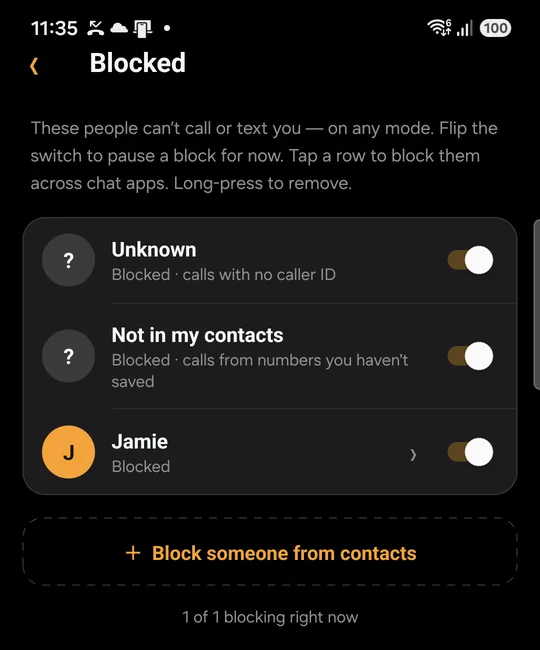
Who calls from unknown numbers
Robocalls
Automated calls that play a recording. They come from numbers you never saved, often a different one every time.
Scam calls
Fake banks, couriers, prizes and tax offices. Scammers keep changing numbers, so blocking them one by one doesn't work.
Call-center calls
Telemarketing and sales calls from call centers, usually from numbers that aren't in your contacts.
Hidden numbers
Calls that show as "Unknown" or "Private" have no caller ID at all.
How to block them with Twinbox
Four steps. About a minute.
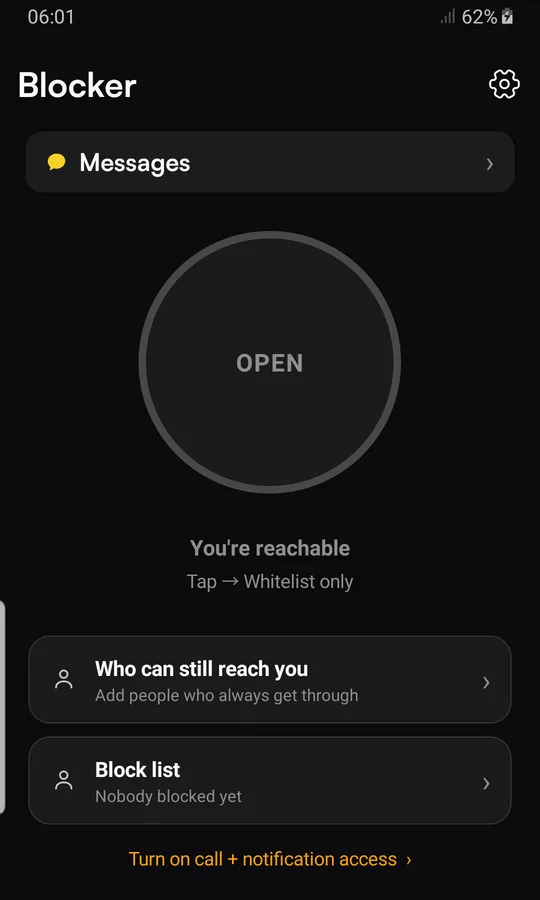
Turn Twinbox on
Install Twinbox from Google Play and tap "Turn on call + notification access".
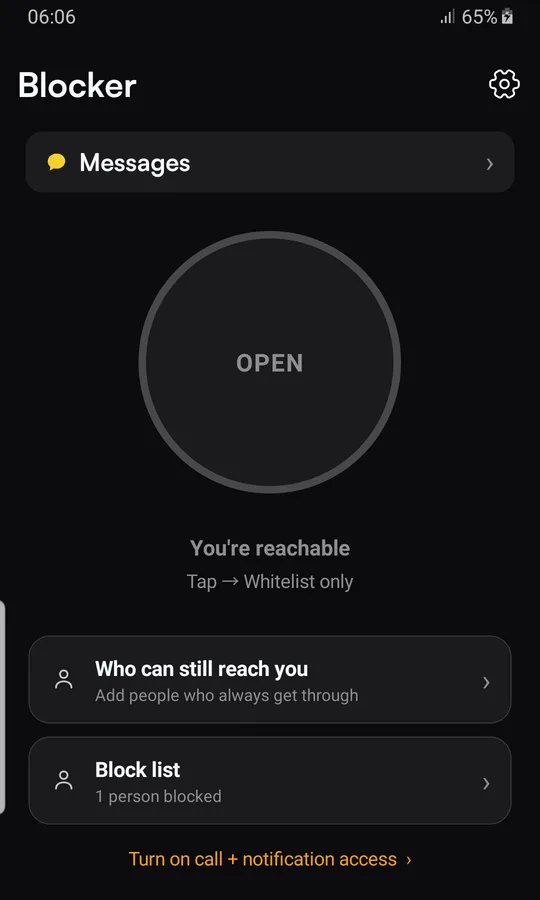
Open the Block list
Tap "Block list" on Twinbox's main screen.
Switch on Unknown
Turn on "Unknown" to reject calls with no caller ID. It stays off until you turn it on.
Strangers too, if you want
Also turn on "Not in my contacts" to reject calls from numbers you haven't saved. Your contacts still ring.
What happens next
Calls with no caller ID, and if you choose, calls from numbers you haven't saved, are rejected without ringing. Your contacts still ring, and text messages are not affected.
Two switches, two jobs
| "Unknown" | "Not in my contacts" | |
|---|---|---|
| Calls with no caller ID | ✓ | ✕ |
| Robocalls and scam calls from unsaved numbers | ✕ | ✓ |
| Call-center and sales calls | ✕ | ✓ |
| WhatsApp and Telegram calls from unsaved numbers | ✕ | ✓ |
| Your saved contacts | Still ring | Still ring |
| Text messages | Not affected | Not affected |
Good to know
- Both switches are off until you turn them on.
- Twinbox does not use a spam list. "Not in my contacts" rejects every number you haven't saved, including a new doctor or a delivery driver.
- Rejected calls are listed under "Recently blocked", so you can see who tried and save a number you want.
- People on "Who can still reach you" always get through.
- Only calls are affected. Text messages, bank codes and delivery texts still arrive.
Questions
How do I block robocalls on Android?
Install Twinbox, tap "Block list" and switch on "Not in my contacts". Robocalls come from numbers you haven't saved, so they are rejected without ringing.
How do I stop scam calls?
Switch on "Not in my contacts" in Twinbox's Block list. Scam calls from numbers you haven't saved are rejected, even when the scammer changes number. Switch on "Unknown" too to reject calls with no caller ID.
How do I block call-center and sales calls?
Call centers call from numbers that aren't in your contacts. With "Not in my contacts" switched on, those calls are rejected without ringing.
Can I block calls with no caller ID?
Yes. Switch on "Unknown" in Twinbox's Block list and calls that show as Unknown or Private are rejected.
Will my contacts still get through?
Yes. Everyone saved in your contacts rings as normal.
Does it block text messages from unknown numbers?
No. Both switches affect calls only, so bank codes and delivery texts still arrive.
Is Twinbox free?
Yes. Twinbox is free on Android.
Step by step on your phone
Take back your phone.
Stop robocalls, scam calls and call-center calls. Free on Android.
▶ Get Twinbox on Google Play