Twinbox › Guides
Instagram · Video callsHow to block Instagram video calls
No more surprise video calls from one person.
Twinbox declines Instagram video and voice calls from the people you choose, on your Android phone. Your Instagram account, chats and contacts stay exactly as they are. Free, set up in about a minute.
▶ Get Twinbox on Google Play- Free on Android
- No change to your Instagram account
- About 1 minute
Quick answer
How to block Instagram video calls in Instagram itself
Instagram's own options, step by step, and where they fall short.
Block the person in Instagram
- Open the person's profile.
- Tap the options icon at the top right.
- Tap Block.
What blocking does in Instagram
They can't find your profile, posts or story. Instagram does not notify them.
To unblock later: Open their profile, tap the options icon and tap Unblock.
The catch
- Block in Instagram is all-or-nothing: it stops their messages and calls together.
- Instagram has no way to block only calls from one person.
- There is no setting for video calls only: voice and video go together.
- Blocking also hides your profile, posts and story from them.
- No temporary or scheduled block: they stay blocked until you unblock them.
- It only works in Instagram. Every other app needs its own block.
The easier way: block Instagram video calls with Twinbox
Four steps. About a minute.
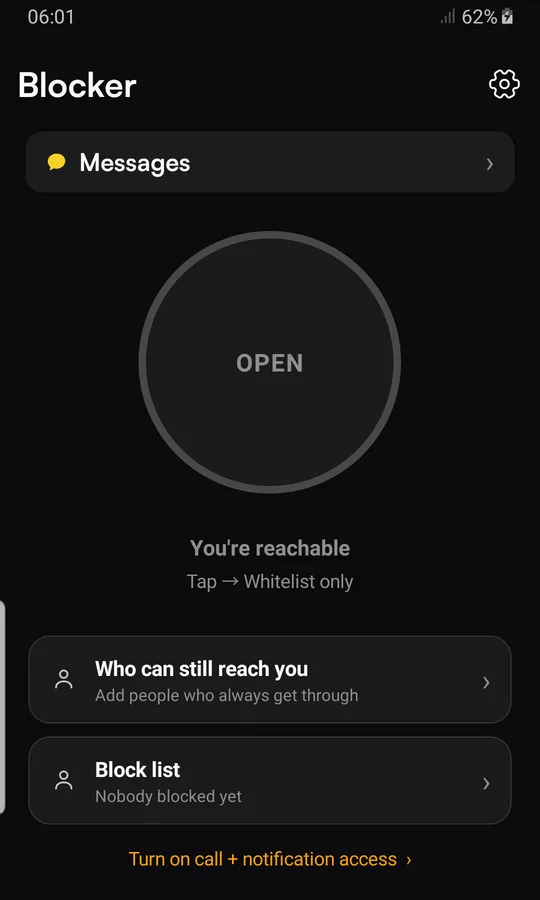
Turn Twinbox on
Install Twinbox, tap "Turn on call + notification access" and switch Twinbox on.

Add the person
Tap "Block list", then "+ Block someone from contacts". If Twinbox asks to be your SMS app, tap "Not now".
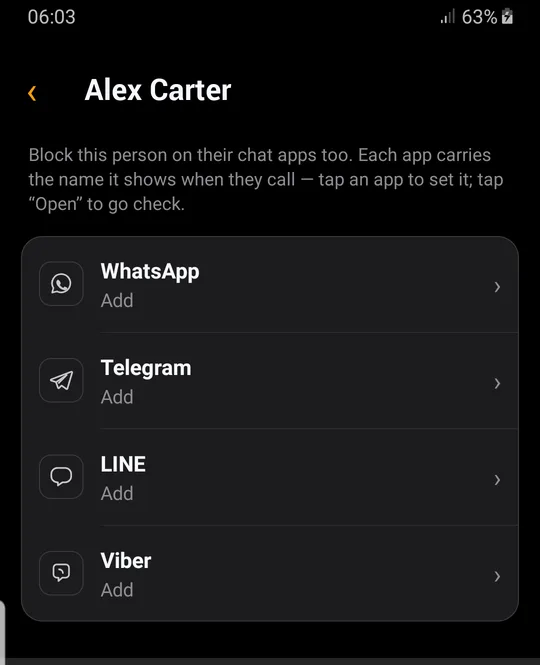
Pick Instagram
Tap the person, then "Block across apps", then Instagram. Type the name exactly as Instagram shows it.
Block video calls
Keep "Block calls" on (voice and video), turn "Hide chat notifications" off, tap "Block".
What happens next
When this person calls you on Instagram, voice or video, Twinbox declines the call. You can see it later in recent blocked activity.
Instagram vs Twinbox
| Instagram itself | Twinbox | |
|---|---|---|
| Stops their messages from arriving | ✓ | ✕ |
| Block only calls, keep messages | ✕ | ✓ |
| Stop video calls from one person | ✕ | ✓ |
| Hide only message notifications, keep calls | Mute only | ✓ |
| No change to your Instagram account or block list | ✕ | ✓ |
| Block for a while or on a schedule | ✕ | ✓ |
| One block list for all your apps | ✕ | ✓ |
When you need it
Video calls at the wrong moment
In a meeting, on the train, in bed: video calls from this person are declined.
A daily video call you never agreed to
Take a break from one person's video calls and keep chatting by text.
Not ready to be on camera
Decline their video calls and reply in your own time.
Why Twinbox
Calls, message notifications or both
Two switches per app: "Block calls" declines their calls, "Hide chat notifications" hides their message notifications. Pick exactly what you want stopped.
You choose how long
Until you unblock, for a while, or on a schedule.
One list for every app
Phone & SMS, WhatsApp, Telegram, LINE, Viber and more. One person, one place.
See who tried
Recent blocked activity shows the person, the app and the time.
Your account stays yours
Twinbox works on your phone. It does not change the block list in your Instagram account.
Private
Twinbox never reads your personal messages or OTP.
Choose what to block on Instagram
| Calls | Video calls | Messages | Calls & messages | |
|---|---|---|---|---|
| Voice calls declined | ✓ | ✓ | ✕ | ✓ |
| Video calls declined | ✓ | ✓ | ✕ | ✓ |
| Message alerts hidden | ✕ | ✕ | ✓ | ✓ |
| Messages kept in Instagram | – | – | ✓ | ✓ |
| Instagram account unchanged | ✓ | ✓ | ✓ | ✓ |
Questions
How do I stop Instagram video calls from one person?
Instagram has no video-only setting. With Twinbox, turn on "Block calls" for the person: it declines their voice and video calls, and you still get their messages.
Can I block Instagram calls without blocking the contact?
Not in Instagram itself: blocking stops their messages too. With Twinbox, yes: turn on "Block calls" and leave "Hide chat notifications" off.
What happens when you block someone on Instagram?
They can't find your profile, posts or story. Instagram does not notify them.
How do I unblock someone on Instagram?
Open their profile, tap the options icon and tap Unblock.
Will the person be blocked inside Instagram?
No. Twinbox handles incoming calls and alerts on your phone. It does not change the block list in your Instagram account, and your chats stay as they are.
Does "Block calls" also stop video calls?
Yes. "Block calls" covers Instagram voice and video calls from this person.
Are blocked messages deleted?
No. Twinbox only hides the alert. The message stays in Instagram and you can read it any time.
Can I block someone only for a while?
Yes. Choose until you unblock, for a while, or on a schedule.
How do I unblock them in Twinbox?
Open the person in your Block list, tap Instagram and tap "Unblock".
Do I need to make Twinbox my SMS app?
No. Blocking Instagram works without it. Twinbox only needs to be your SMS app to block regular SMS.
What access does Twinbox need?
Notification access and Do Not Disturb access, so it can handle Instagram calls and alerts. Available behavior depends on your Android device and the calling app.
Will I see anything when a blocked call comes in?
A call screen can appear briefly while Twinbox handles an app call, especially the first time. Twinbox applies Do Not Disturb to keep it quiet.
Does Twinbox read my messages?
No. Twinbox never reads your personal messages or OTP.
Is Twinbox free?
Yes. Twinbox is free on Android.
More Instagram guides
Same guide, other apps
Block regular phone calls too
Take back your phone.
Decline calls and hide message notifications from one person, on any chat app. Free on Android.
▶ Get Twinbox on Google Play