Twinbox › Guides
Samsung · Phone & SMSHow to block text messages on Samsung
Their texts never reach your inbox.
With Twinbox as your SMS app, text messages from the people you block are dropped: no inbox, no notification. Free on your Samsung phone.
▶ Get Twinbox on Google Play- Free on Android
- Phone calls, SMS and chat apps
- About 1 minute
Quick answer
How to do it in Samsung's own settings
The built-in way, step by step, and where it falls short.
In Samsung settings
- Open Samsung Messages and touch and hold the conversation.
- Tap More > Block.
- Tap Block to confirm.
What blocking does on Samsung
Blocked numbers won't be able to reach you: their calls and text messages won't disturb you.
To unblock later: Phone > More options > Settings > Block numbers > tap the red minus next to the number.
The catch
- A blocked number stays blocked until you unblock it: no timer, no schedule for one person.
- It only covers phone calls and SMS. WhatsApp, Telegram and other chat app calls still ring.
- Menu names differ between Samsung models and software versions.
The easier way: block text messages with Twinbox
Four steps. About a minute.
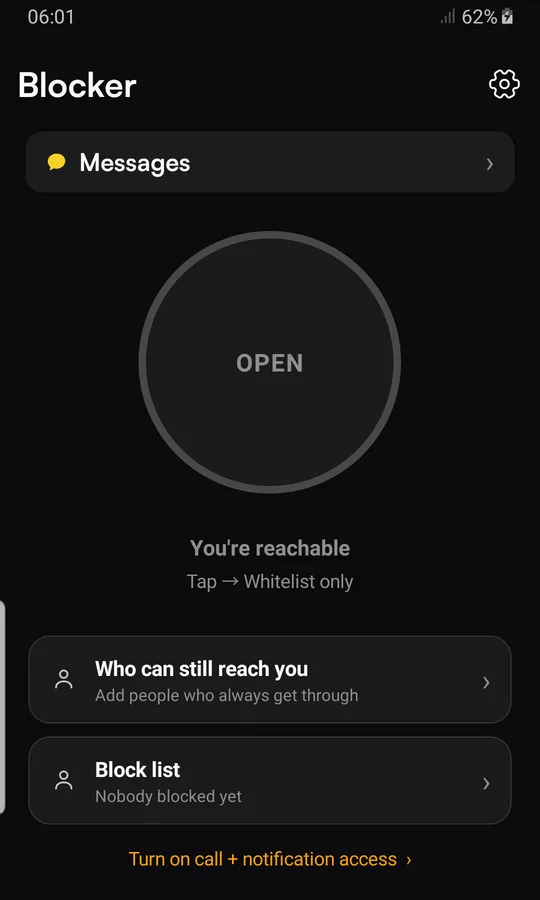
Turn Twinbox on
Install Twinbox from Google Play and tap "Turn on call + notification access".
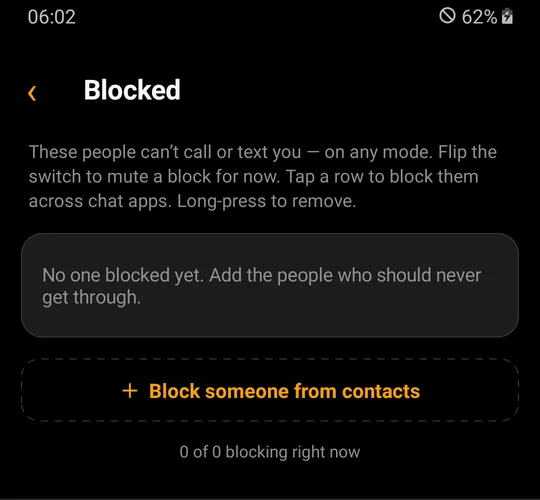
Add the person
Tap "Block list", then "+ Block someone from contacts" and pick the person.
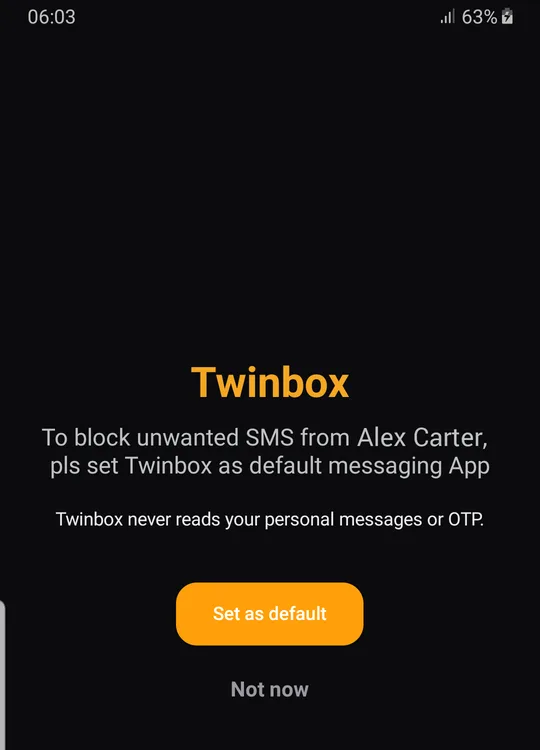
Set as default
Tap "Set as default" so Twinbox can block their regular calls and SMS.

Choose how long
"Until I unblock", "For a while" or "On a schedule".
What happens next
Their text messages are dropped: no inbox entry, no notification, nothing stored.
Samsung vs Twinbox
| Samsung settings | Twinbox | |
|---|---|---|
| Block one number (calls + SMS) | ✓ | ✓ |
| Block for a while | ✕ | ✓ |
| Block on a schedule (days, hours) | Do Not Disturb (everyone) | ✓ |
| Only chosen people get through | ✓ | ✓ |
| Also blocks WhatsApp, Telegram & more | ✕ | ✓ |
| No missed-call notification | Not documented | ✓ |
When you need it
Pushy texts
Their messages never reach your inbox or your lock screen.
One inbox, no noise
Twinbox is also your SMS app: read and send texts as normal.
Private by design
Twinbox never reads your personal messages or OTP.
Why Twinbox
No ring, no trace
Blocked calls are rejected before they ring, with no missed-call notification.
You choose how long
Until you unblock, for a while, or on a schedule with days and hours.
Calls and SMS together
One block covers the person's calls and text messages.
Every app, one list
The same person can be blocked on WhatsApp, Telegram, LINE, Viber and more.
Whitelist only
One tap and only the people on your list can reach you.
Private
Twinbox never reads your personal messages or OTP.
Questions
Does blocking a number on Samsung also block texts?
Yes. Samsung says a blocked number's calls and text messages won't disturb you.
What happens when you block a number on Samsung?
Blocked numbers won't be able to reach you: their calls and text messages won't disturb you.
How do I unblock a number on Samsung?
Phone > More options > Settings > Block numbers > tap the red minus next to the number.
Can I block a number only for a while?
Not with a normal block: it stays until you remove it. With Twinbox, choose "For a while" or "On a schedule" and the block ends on its own.
Will a blocked call show in my call log with Twinbox?
It is listed as a blocked call, but your phone never rings and you get no missed-call notification. Twinbox also lists it under "Recently blocked".
Where do blocked text messages go with Twinbox?
Nowhere. When Twinbox is your SMS app, texts from a blocked number are dropped: no inbox entry, no notification, nothing stored.
Do I need to make Twinbox my SMS app?
Yes, to block text messages. Only the default SMS app can stop texts from reaching your inbox.
Can I let only my contacts call me?
Yes. On Twinbox's Block list, switch on "Not in my contacts". Only numbers saved in your contacts ring; it works for phone calls and for WhatsApp and Telegram calls.
Does Twinbox read my messages?
No. Twinbox never reads your personal messages or OTP.
Is Twinbox free?
Yes. Twinbox is free on Android.
More Samsung guides
Same guide, other phones
Block chat app calls too
Take back your phone.
Block calls and texts from anyone, for as long as you want. Free on Android.
▶ Get Twinbox on Google Play